> For the complete documentation index, see [llms.txt](https://docs.aiplanet.com/genai-stack-1/llms.txt). Markdown versions of documentation pages are available by appending `.md` to page URLs; this page is available as [Markdown](https://docs.aiplanet.com/genai-stack-1/usecases/chat-with-multiple-documents.md).
# Chat with Multiple Documents
In this use case, we will implement a Chat with multiple documents. We will have different kinds of documents including Youtube video, PDF and Web URL.
Let's build the stack. Create a new project and select Chat stack.
### Step-1: Load the Data from different sources and chunk them
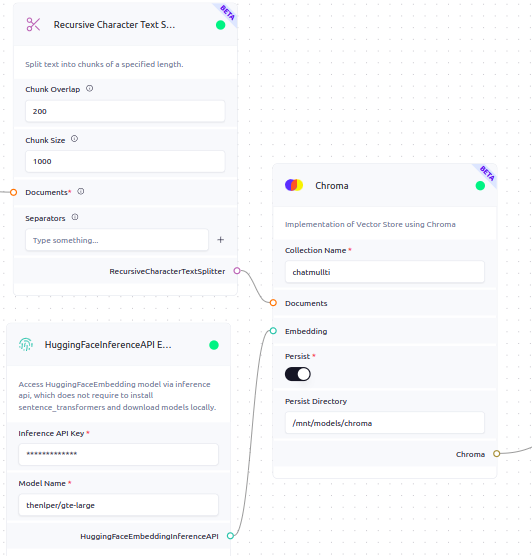
The first step is to pick the different loaders needed for your use case. You can also combine PDF, Document, URL, YouTube, subtitles, song lyrics together. Once we load the content, we split the document into smaller chunks. Make sure, to provide meta data when you are working with multiple data loaders.
After loading the content, we divide the document into smaller segments. This segmentation is necessary because it enables us to provide users with relevant information from the appropriate chunk when they query any prompt.
Check all the loader list: and more information on text splitters:
### S**tep 2: Index your document**
To index a document, it's crucial to generate an embedding for each section and save it in a vector database. Turning on the persist option avoids the need to recreate indexes for existing content.
We use vector storage to store the embeddings of the document and retrieve them based on search techniques for the given prompt. The Vector Store accommodates various search types, with similarity search being utilized in this instance.
Since we are handling large chunks of data, it is advisable to enable persistence in the directory. This ensures that we do not recreate the index if it has already been created. We can use the directory `/mnt/models/chroma` for persistence.
### Step-3: Generator and Retriever
The Retrieval-Augmented Generation (RAG) pipeline involves two main parts: the Retriever and the Generator. The Retriever finds useful information from the index based on the user's query. Then, this relevant information, along with the prompt, is given to the Large Language Model (LLM), which acts as the generator in the RAG pipeline.
Learn what is RAG and how it works:
### Step-4: Chat with your multiple document
Build the stack(⚡), Upon a successful build, navigate to the chat icon to commence interaction.