> For the complete documentation index, see [llms.txt](https://docs.aiplanet.com/genai-stack-1/llms.txt). Markdown versions of documentation pages are available by appending `.md` to page URLs; this page is available as [Markdown](https://docs.aiplanet.com/genai-stack-1/components/vector-store.md).
# Vector Store
Vector databases make it possible to draw comparisons via semantic search, identify relationships, and understand the context within the vector Embeddings. One additional advantage of vector stores is that we can use them as a retriever, where, based on a user query, it returns the relevant information.
A few of the popular Vector Store or Vector Databases are: Chroma, Weaviate, Qdrant, Milvus, FAISS, ElasticSearch and Pinecone. GenAI Stack currently supports Reddis, and Weaviate.
These Vector Stores can further be connected to retrievers.
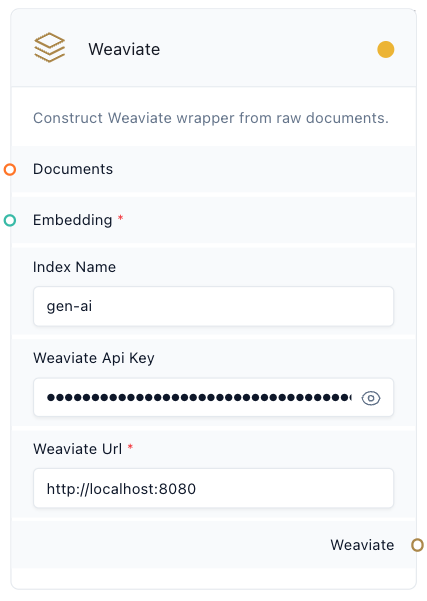
### Weaviate
Weaviate is an open-source vector search engine that stores both objects and vectors. It also supports cloud clients to store vector embeddings.
**Parameters**
* Documents: The chunked or loaded document component.
* Embeddings: Embedding component to convert documents into vectors.
* Index Name: A unique identifier to save the index
* Weaviate API Key: Weaviate API key for the cluster created on Weaviate cloud
* Weaviate URL: Cluster URL on Weaviate cloud
Example usage:
### **Redis**
Redis is an open-source, in-memory vector store. It offers low-latency reads and writes, making it suitable for use cases that require a cache.
Parameters
* Documents: The chunked or loaded document component.
* Embeddings: Embedding component to convert documents into vectors.
* Redis Index: A unique identifier for the index created in Redis
* Redis server connection string: The server connection string is the address and credentials for connecting to the Redis server
Example usage: